 Chrome extension for web calendars
Share your screen,not your schedule.
Calendar(s) privacy blur hides every event title in Google Calendar, Outlook on the web and any other calendar you add. One click on its toolbar button, and you are ready to present.
Free and open source · Not affiliated with Microsoft or Google
A sample week with the extension's own rules. Click the toolbar icon, the switch, or press B.
Built for the moment before you hit “Share”.
Install it once
Nothing changes until you ask. Your calendar looks exactly as before, with an OFF badge on the button.
Click before you share
Titles, times and places blur in every open calendar tab; colours and layout stay. People see a busy week, not what fills it.
Click to reveal
The same button brings titles back once the call is over. The OFF badge shows which state you are in.
Small, precise, and out of your way.
One click, every tab
The toggle applies to all open calendar tabs at once and is remembered across restarts.
Only the events
Scoped selectors blur event chips and nothing else, so navigation, dates and buttons stay readable.
Add any calendar
Point it at another https site with a CSS selector, and test the rule on an open tab before saving.
Nothing leaves the browser
No network requests, no analytics, no page reading. It adds a stylesheet and takes it away.
Instant
Blur is plain CSS applied by the browser, so it appears with the page and survives navigation.
Open source
Every line is on GitHub, with no build step: what you read is what runs.
A privacy tool that doesn’t need your data.
There when you need it.
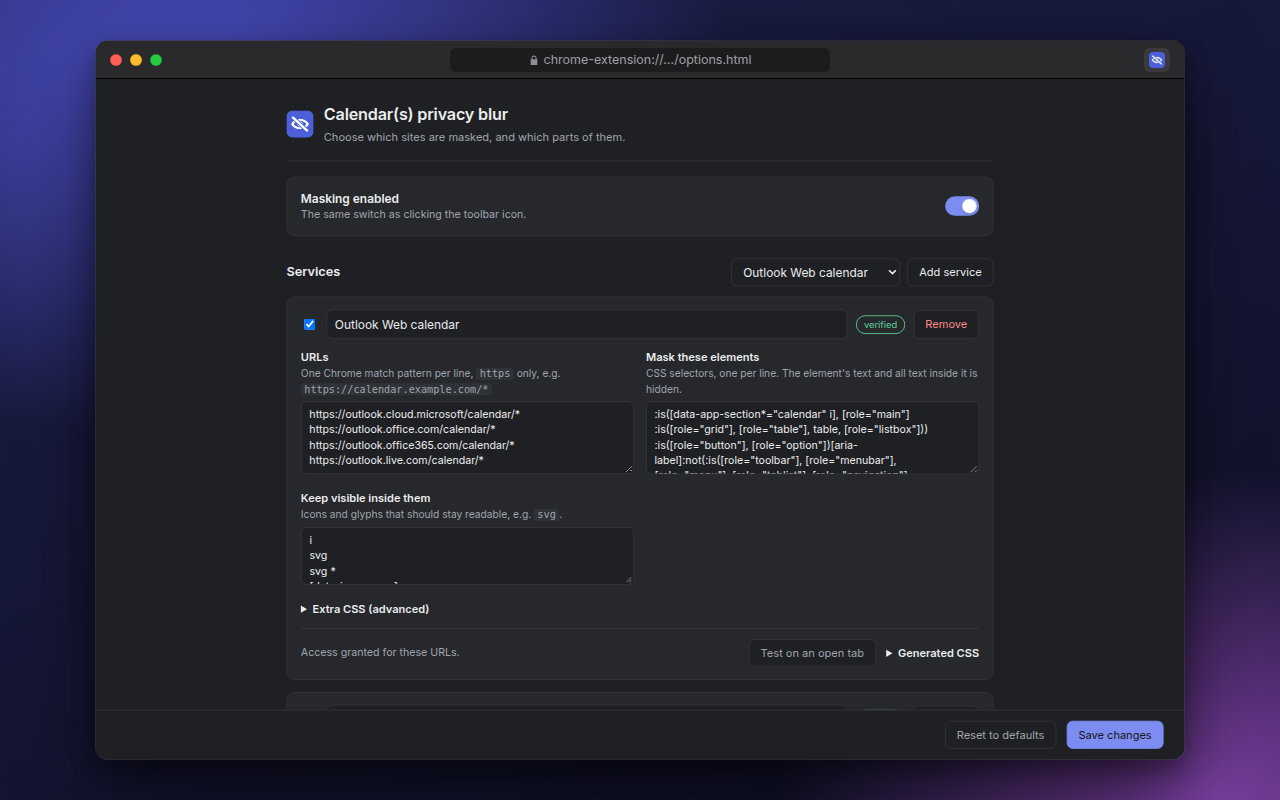
Right-click the toolbar button and choose Options.
- Turn each calendar on or off.
- Add another site with its own selector.
- Count matches on an open tab before saving.
- Each new site asks for its own permission.
Questions, answered.
Does it work with Zoom, Teams, Meet and others?
Yes. The blur is applied to the calendar page itself, so whatever shares your screen, window or tab shows it blurred.
What exactly is blurred?
The text inside each event: title, time and location. Event colours and the calendar around them stay as they are.
Is anything still visible?
Hover cards and an opened event still show full details; the blur covers the calendar grid. The text is hidden, not deleted, so it protects against onlookers, not against someone at your keyboard.
Do I need to reload my calendar?
No. Turning blur on or off applies to open calendar tabs straight away, including ones that were open before you installed it.
Can I use it with another calendar?
Yes. In settings, add the site’s address and a CSS selector for its events. The extension asks for permission to that site only.
Something isn’t blurred, or I found a bug.
Calendars change their pages now and then. Raise an issue on GitHub with the calendar and what you saw, and it will get fixed.